
Projects & web
Wizard auto-creates virtual host and PHP-FPM pool (disable with UADMIN_AUTO_PROVISION_WEB=false). Domain, PHP 7.4–8.5, Apache/Nginx backend, vhost editor, file manager, SSL and clickable project list.
Enterprise · Web & mail hosting · Ubuntu 24.04
uAdmin — enterprise-grade control panel for VPS web hosting, authoritative DNS and self-hosted email on your own Ubuntu servers.
uAdmin (Ubuntu Web Admin) is an open-source web panel for Ubuntu servers, designed for developers and system administrators who need more control than classic hosting panels offer. It enables straightforward server and web application management with full configuration access, without expensive licenses and unnecessary restrictions.
Fast dashboard with lazy loading, automatic virtual host and PHP-FPM pool on project create, CMS auto-install (WordPress, Joomla, Nextcloud, Moodle, PrestaShop, Drupal), site migration from CyberPanel and cPanel (web, database, mail, DNS, SSL), authoritative DNS (PowerDNS) with wizard install on a dedicated VM, mail server (Postfix, Dovecot, Roundcube webmail) with DNS automation and webmail SSO, zone and record management, DynDNS for dynamic hosts, one DNS server shared across multiple panels, reverse proxy, MariaDB, Let's Encrypt SSL, Fail2ban, GeoBlock and IP protection — from one interface, plus CLI and recovery tools.
Built with Laravel. Server changes go only through whitelisted scripts in /usr/local/uadmin/bin — production-safe and transparent for sysadmins.
Panel version (stable) 1.0.451 (2026-10-01)
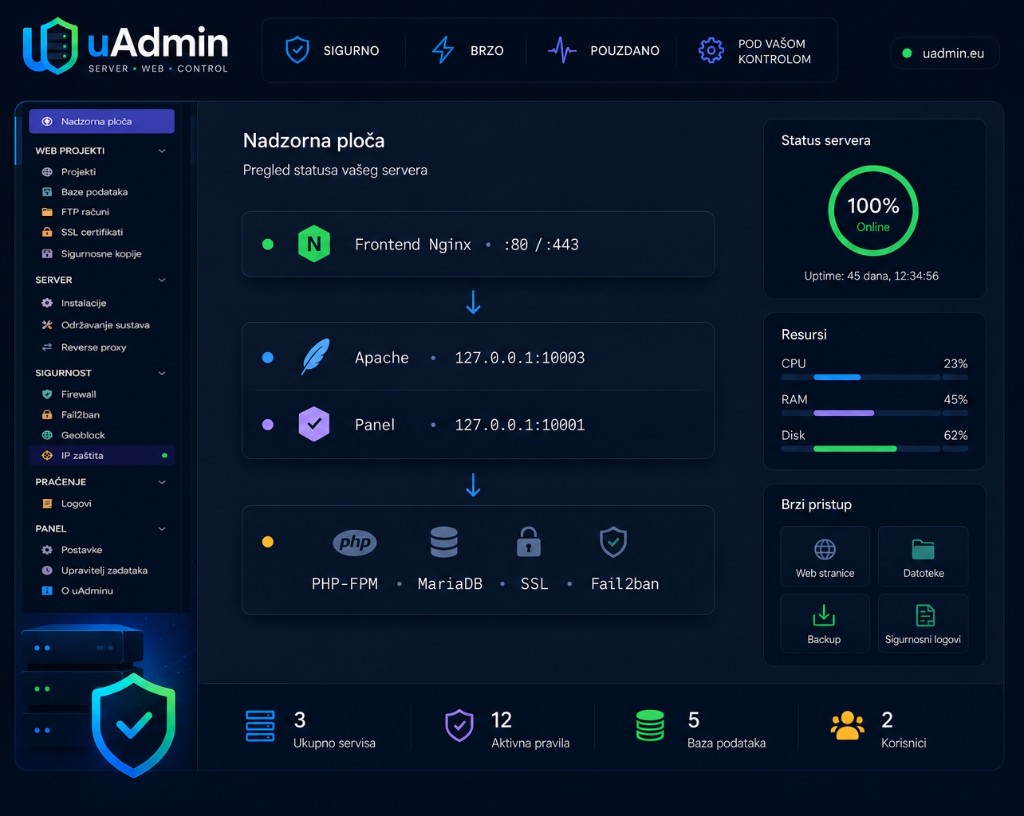
A free enterprise web and mail hosting platform for developers and sysadmins — flexible LAMP hosting on your own VPS with DNS, email, monitoring and automation.
Wizard auto-creates virtual host and PHP-FPM pool (disable with UADMIN_AUTO_PROVISION_WEB=false). Domain, PHP 7.4–8.5, Apache/Nginx backend, vhost editor, file manager, SSL and clickable project list.
Frontend Nginx on ports 80/443, project backends on localhost ports. Apache and Nginx projects together — centralized SSL and HTTP/2.
GUI stack install: Apache, Nginx, PHP-FPM versions, MariaDB, Certbot, Adminer, vsftpd, UFW, Fail2ban. Global PHP.ini and PHP extensions per version.
Fast load (< 2 s): server resources, swap, SSL alerts, Project Health (per-project traffic today/month), Fail2ban summary and service status load via lazy AJAX.
Per-project file, database and config backups, SFTP archiving, restore and audit trail. Offsite backup server (optional): panel, DNS, mail and project copies — Backup all, scheduling and archive download from the panel.
OTA upgrades, OS apt maintenance, Cleanup tab (disk/cache, journal). Mail/DNS install maintenance step: 7-day journal and automatic security updates on infrastructure VMs. UI themes and SMTP.
Preset jails for SSH, FTP, web auth, panel login and CMS admin attempts. Ban overview, unban actions, logs, global settings, ignoreip and dashboard summary.
Web GUI and SSH tools for OTA rollback, maintenance mode, stack repair and password reset. 9 CSS themes (including refreshed Gold) — each user picks their own.
GeoBlock for SSH and individual web projects, with per-project country rules. Threat Security adds public threat intelligence feeds, automatic nftables sets and manual indicator checks.
Applications tab on the project page — one-click install for WordPress, Joomla 5/6, Nextcloud, Drupal, Moodle 5 or PrestaShop 8/9. The panel creates the database, applies PHP presets, nginx profiles (Nextcloud, Moodle, PrestaShop), Fail2ban/WAF profile and shows the admin URL.
Wizard installs primary or secondary DNS on a dedicated Ubuntu 24.04 VM: MariaDB, PowerDNS, uAdmin connector, TLS, UFW and enrollment key. Attach existing server, health checks, credential sync. GUI re-apply of install steps (maintenance, firewall, connector, TLS) from DNS → Server data — no SSH on the DNS server.
CRUD for zones and records, templates (web, mail), global mail settings (MX, SPF, DMARC, DKIM), secondary DNS via AXFR. Projects can get a DNS zone and A/MX records from the panel — one DNS, multiple uAdmin instances.
Manage dynamic DNS hosts from the panel: create a DynDNS record in a zone, generate username and password, and let the client (router, NAS, script) update the A/AAAA record via HTTPS update API on the DNS server.
Wizard installs Postfix, Dovecot, Roundcube webmail and rspamd on a dedicated Ubuntu 24.04 VM. Domains, mailboxes, webmail SSO, Rspamd rejected messages in the database (full log, delete, 90-day retention). Optional webmail panel proxy when panel and mail share the same public IP. MX/SPF/DKIM/DMARC via the DNS module.
Register a separate VPS for offsite copies: preflight, SSH setup, active server. Backup all in one click (panel + DNS + mail + projects), scheduled offsite backup, multiple panels on one server (partitions by panel_instance_id), restore and Download archive from the panel.
A web GUI and CLI move sites from CyberPanel or cPanel: files, database, mailboxes, forwarders (a copy stays in the mailbox), DNS zone and Let's Encrypt if public DNS already points at this server.
uAdmin includes a full PowerDNS module: wizard install, zones, DynDNS, mail templates and firewall — no manual SSH on the DNS server. The same DNS infrastructure can be shared by multiple panels (e.g. production and staging).
SSH wizard on a fresh VM installs the stack, generates API keys, opens ports only for panels and prepares enrollment for attaching other instances.
Create zones, A/AAAA/CNAME/MX/TXT records, apply web and mail templates, DynDNS hosts and glue NS records for your registrar.
A second uAdmin connects with an enrollment key — API keys are not rotated automatically; firewall accumulates all panel IPs. Sync credentials if health reports auth errors.
Dynamic hosts in your own zone — the panel creates the record and credentials; the device sends updates when its public IP changes. GUI re-apply of maintenance, firewall, connector and TLS without manual SSH.
uAdmin includes a full mail module on a dedicated VM: Postfix, Dovecot, Roundcube webmail, rspamd and connector API. Domains, mailboxes, webmail SSO, queue management and TLS — no manual SSH on the mail server. DNS module integration automatically sets MX, SPF, DKIM and DMARC.
SSH wizard on a fresh Ubuntu 24.04 VM installs the stack, generates API keys, configures UFW (ports 25, 587, 465, 993, 995, 443) and issues a TLS certificate via DNS-01.
Create virtual domains, mailboxes with quota, forwarders and rspamd thresholds. The panel shows IMAP/POP3/SMTP settings for clients (including port 25).
The «Open webmail» button generates a one-time SSO link from the panel — Roundcube logs in without manual password entry. Webmail URL is webmail.{domain} per virtual domain.
Rejected messages in MariaDB with full raw log, automatic ingest and delete from the panel. Offsite backup server can archive the mail VPS and projects from the panel. Let's Encrypt certificate includes mail.{domain} and webmail.{domain}.
Move existing sites to uAdmin without copying files and databases by hand. The panel web GUI (same token as Recovery) or CLI on the VPS transfers web, database, mail and DNS — with a test-first approach before DNS cutover.
CyberPanel is live-tested (SSH). cPanel works over SSH, without SSH via UAPI+FTP, or FTP-only when a valid UAPI login is not available.
Files, MariaDB dump, Maildir messages, mailboxes and forwarders are transferred. A forwarder always keeps a copy in the local mailbox, then sends onward. Mailbox passwords are regenerated.
The zone is created from scratch on uAdmin (A, MX, SPF, DKIM, DMARC). If the source had SSL and public DNS already points here, Let's Encrypt is issued automatically.
Open https://panel:10001/panel-migrate/ — same recovery token. Pick a site, run all and watch the log. Use the server command only if you need to repeat a single step or automate the process.
Separate frontend proxy and per-project backend engines.
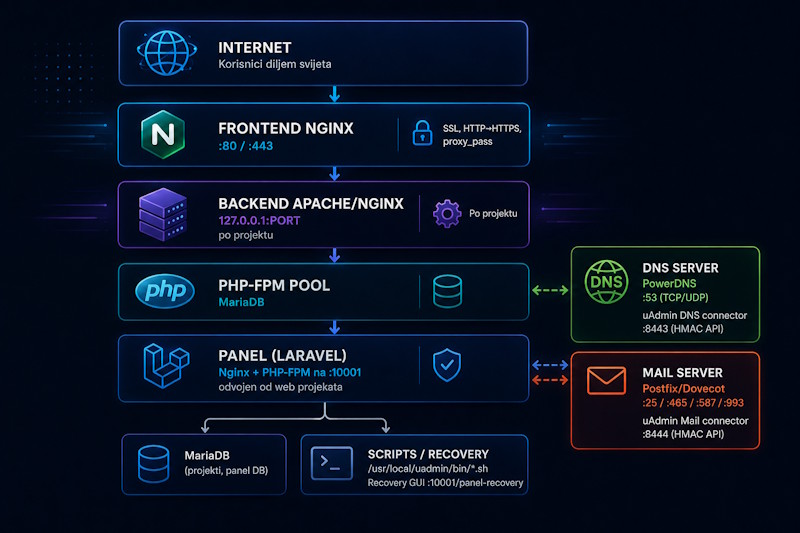
Installation, panel access, DNS, mail, migrations, security, OTA, users, recovery, CLI commands and troubleshooting.
One-line install on a fresh Ubuntu 24.04 VM (root SSH):
curl -fsSL https://enc-it.hr/uadmin/install-uadmin-from-release.sh | sudo bash
You can set passwords and hostname before running:
export UADMIN_PANEL_HOSTNAME="panel.example.com"
export UADMIN_DB_PASS="your-mariadb-password"
curl -fsSL https://enc-it.hr/uadmin/install-uadmin-from-release.sh | sudo -E bash
Installation takes a few minutes. Then open the panel, change the admin password, run Installations → stack wizard (PHP-FPM, MariaDB, Certbot, Fail2ban…) and review Settings → Security.
The panel is separate from web projects — it runs on port 10001. Client websites use standard ports 80/443.
Panel URL (example):
https://<hostname>:10001
Web project (example):
https://<domena>
After install use the default account — change the password immediately in Settings → Users.
E-mail:   admin@localhost
Password: changeme
MariaDB and other generated passwords are stored in:
/home/uadmin/INSTALL-PASSWORDS.txt
/root/uadmin-INSTALL-PASSWORDS.txt
In the panel: Settings → Panel SSL — Let's Encrypt certificate for the panel hostname (e.g. panel.example.com:10001). Web projects have separate SSL in the SSL module per domain.
Before the first project run Installations → wizard: PHP-FPM versions, MariaDB, Certbot, Adminer, vsftpd, UFW and Fail2ban. Apache is usually already installed with the panel.
After login the panel immediately shows server resources (CPU, RAM, disk, swap). Project Health (traffic per project), Fail2ban summary and service status widgets load in the background — the page is ready in seconds instead of tens of seconds.
System maintenance → Cleanup tab: scan and remove cache/apt archive, vacuum systemd journal with permanent journald.conf settings, and prune old OTA panel release versions.
uAdmin can manage a dedicated authoritative DNS server: install on a new Ubuntu 24.04 VM, attach an existing stack or run secondary DNS with AXFR replication. Everything through the DNS module in the sidebar — no manual zone file editing on the server.
DNS → Install primary server. Enter IP, hostname (e.g. dns1.example.com), SSH access and panel egress IP (this uAdmin panel IP for firewall). Wizard installs MariaDB, PowerDNS, connector, UFW and enrollment key. After completion: health check and zone management.
On another uAdmin panel: DNS → Attach existing. Use the enrollment token from the primary server (DNS → Server management). The new panel does not rotate the API key — the same DNS can serve production and staging panels. On each panel: Sync API credentials if health reports auth errors.
DNS → Zones: create a domain, edit A/CNAME/MX/TXT records, apply templates (web, mail). Glue/NS settings for registrars. When creating a web project enable DNS support — the panel automatically creates the zone and basic records if DNS is active.
DNS → DynDNS: add a host in an existing zone (e.g. home.example.com); the panel generates update credentials. The client sends an HTTPS request to the DNS server update port (8088/tcp) — the A/AAAA record updates automatically when the public IP changes.
DNS VM: 53/tcp+udp (public), SSH, connector API (8443/tcp — only from panel IPs), DynDNS update (8088). From the panel: re-apply install steps (maintenance, firewall, connector, TLS) in DNS → Server data — no SSH on the DNS server.
Detailed steps in Guides → DNS category (install, attach, zones, DynDNS).
uAdmin can manage a dedicated mail server: install on a new Ubuntu 24.04 VM, virtual domains, mailboxes, forwarders, webmail SSO and rspamd antispam. Everything through the Mail module in the sidebar — no manual Postfix/Dovecot configuration editing.
Mail → Install mail server. Enter IP, hostname (e.g. mail.example.com), SSH access and panel egress IP. Wizard installs Postfix, Dovecot, Roundcube, rspamd, connector, UFW and TLS certificate. After completion: health check and add the first domain.
Mail → Domains and Mail addresses: create virtual domains and mailboxes. If DNS Primary is active, the panel automatically adds MX/SPF/DMARC/DKIM. The «Open webmail» button launches SSO in Roundcube at webmail.{domain}.
The Mail addresses page shows IMAP (993 SSL), POP3 (995 SSL), SMTP (25, 587 STARTTLS, 465 SSL). Use mail.{domain} as the hostname in Outlook or Thunderbird.
Mail → Server settings → Issue/Renew certificate. Let's Encrypt DNS-01 includes mail.{domain} and webmail.{domain} for each virtual domain. Renew the certificate after adding new domains.
Mail VM: 25, 587, 465 (SMTP), 993 (IMAPS), 995 (POP3S), 443 (webmail), SSH, connector API (8444/tcp — only from panel IPs). After panel OTA re-apply install steps on the mail VM (Dovecot, Firewall, Roundcube, Connector).
Detailed steps in Guides → Mail category (install, domains, webmail SSO, TLS).
The migrate-panel tool moves an existing site to uAdmin: web files, database, mailboxes, forwarders and DNS zone. It runs on the uAdmin VPS (root) and talks to the source panel over SSH, UAPI or FTP. The same code backs the web GUI at /panel-migrate/.
On the uAdmin panel open /panel-migrate/ (port 10001). Sign-in uses the same recovery token as the Recovery GUI. Choose the source panel, fetch the site list, run all and watch the log.
https://<hostname>:10001/panel-migrate/
Token (same as Recovery):
sudo cat /home/uadmin/shared/recovery-token
CyberPanel: SSH (live-tested). cPanel: SSH on VPS/WHM, UAPI+FTP without SSH on shared hosting, or FTP-only if UAPI is unavailable. Joomla and WordPress config is rewritten to the new database automatically.
The migrate.sh script does the actual work. The web interface only starts that script so you do not need a terminal. To repeat a single step (export, provision, web import, mail, DNS, SSL) or to automate it, run this on the uAdmin server:
sudo /home/uadmin/app/tools/migrate-panel/migrate.sh list-sites
sudo /home/uadmin/app/tools/migrate-panel/migrate.sh all --domain=example.com
Step-by-step guide: Guides → Migrating from CyberPanel/cPanel.
uAdmin provides panel login protection, Fail2ban preset jails, GeoBlock for SSH and individual web projects, Threat Security with threat feeds, a ban summary on the dashboard and project log management.
Settings → Security: configure max login attempts and time window (default 5 attempts in 60 seconds per IP). When exceeded, a temporary lockout message is shown.
Install Fail2ban via Web stack → Install. In the sidebar open Security: jail overview (sshd, nginx-http-auth, apache-auth, vsftpd, uadmin-panel-login, uadmin-cms-admin-login), banned IPs, global settings, log and the Top 10 banned countries dashboard card.
Preset jails include uadmin-panel-login (panel port 10001) and uadmin-cms-admin-login (Joomla /administrator, WordPress wp-login.php on ports 80/443). Bans use UFW when available, while ignoreip protects trusted addresses.
GeoBlock uses the GeoLite database plus nftables/nginx rules to control access by country. It can protect global SSH access, but also each web project separately: every project has its own country selection and its own Apply action.
Threat Security syncs public threat feeds, normalizes IP/CIDR indicators and generates nftables sets for auto-managed lists such as Spamhaus DROP and Tor exit nodes. After sync it automatically generates and applies relevant sets, while the manual set stays under administrator control.
Recommended: install UFW (Firewall module) before or together with Fail2ban. Bans are applied via UFW when available.
In Security → Settings set ignoreip (e.g. your office IP) so you do not ban yourself. Do not disable the sshd jail without reason.
The panel updates without losing projects. In Settings → Updates enter the manifest URL (Enc IT channel):
UADMIN_UPDATE_MANIFEST_STABLE=https://enc-it.hr/uadmin/stable.json
UADMIN_UPDATE_MANIFEST_BETA=https://enc-it.hr/uadmin/beta.json
UADMIN_UPDATE_MANIFEST_NIGHTLY=https://enc-it.hr/uadmin/nightly.json
Channels
Same from the shell (root):
sudo /usr/local/uadmin/bin/update-uadmin.sh update
Admin users are separate from project FTP/MariaDB users. Manage in Settings → Users (add, role, password).
At http://<server>:10001/panel-recovery/ enter the token and reset an admin password.
http://<server-ip-or-host>:10001/panel-recovery/
Replace email and new password (min. 8 characters):
sudo -u uadmin php8.3-cli /home/uadmin/app/artisan tinker --execute="
  \$u = App\Models\User::where('email', 'admin@localhost')->first();
  if (!\$u) { echo 'Korisnik nije pronađen'; exit(1); }
  \$u->password = 'NovaSigurnaLozinka123';
  \$u->save();
  echo 'OK: '.$u->email;
"
Prefer Settings → Users in the panel. For emergencies via SSH:
sudo -u uadmin php8.3-cli /home/uadmin/app/artisan tinker --execute="
  App\Models\User::create([
    'name' => 'Admin',
    'email' => 'admin@example.com',
    'password' => 'NovaSigurnaLozinka123',
    'role' => 'admin',
  ]);
  echo 'User created';
"
Recovery works even when the main panel returns 503 (maintenance after OTA) or an update hangs. Tools live outside the Laravel release — they survive rollback.
Web GUI (port 10001):
http://<server-ip-or-host>:10001/panel-recovery/
Recovery token (SSH, root):
sudo cat /home/uadmin/shared/recovery-token
The token is created on install/update. Without it the GUI will reject actions.
Interactive SSH menu (root):
sudo bash /usr/local/uadmin/bin/panel-recovery.sh
Direct SSH commands (root):
Same actions without the interactive menu. For switch-release replace X.Y.Z with a version from /home/uadmin/releases/.
sudo /usr/local/uadmin/bin/update-uadmin.sh maintenance-off
sudo /usr/local/uadmin/bin/update-uadmin.sh rollback
sudo /usr/local/uadmin/bin/update-uadmin.sh switch-release --version X.Y.Z
sudo bash /usr/local/uadmin/bin/panel-recovery.sh
sudo /usr/local/uadmin/bin/recovery-stack.sh status
sudo /usr/local/uadmin/bin/recovery-stack.sh repair all
All commands for panel maintenance. Scripts are in /usr/local/uadmin/bin/.
sudo /usr/local/uadmin/bin/update-uadmin.sh status
sudo /usr/local/uadmin/bin/update-uadmin.sh update
sudo /usr/local/uadmin/bin/update-uadmin.sh list-releases
sudo /usr/local/uadmin/bin/update-uadmin.sh rollback
sudo /usr/local/uadmin/bin/update-uadmin.sh switch-release --version 1.0.397
sudo /usr/local/uadmin/bin/update-uadmin.sh maintenance-off
sudo /usr/local/uadmin/bin/update-uadmin.sh maintenance-off --force-lock
sudo /usr/local/uadmin/bin/update-uadmin.sh repair
Interactive menu — same actions as recovery GUI, handy over SSH without a browser.
sudo bash /usr/local/uadmin/bin/panel-recovery.sh
Laravel commands — always from the current release:
cd /home/uadmin/app
sudo -u uadmin php8.3-cli artisan migrate --force
sudo -u uadmin php8.3-cli artisan config:cache
sudo -u uadmin php8.3-cli artisan route:cache
Verify the panel after install or update:
sudo -u uadmin php8.3-cli /home/uadmin/app/bin/smoke-test.php
CSRF/session cookie from old APP_URL or expired session. Clear cookies for panel host:port or use a private window. Ensure APP_URL in /home/uadmin/shared/.env matches the browser URL (http/https, port).
Panel is in maintenance mode. Recovery: maintenance-off or recovery GUI → Disable maintenance. If update lock is stuck: maintenance-off --force-lock.
Conflict between uadmin-acme (panel SSL challenge) and uadmin-proxy-<domain> (web project) — both listen on :80. Fix: remove sites-enabled/uadmin-acme when a frontend proxy exists for that domain, or update the panel to a version that skips this automatically.
After install with no web projects Apache has no Listen port. The panel creates idle Listen 127.0.0.1:8081. Run: sudo /usr/local/uadmin/bin/ensure-frontend-proxy.sh or stack repair apache.
The panel uses rate limiting (Settings → Security) and the uadmin-panel-login Fail2ban jail. Rate limit lasts minutes; Fail2ban bans may last hours. Unban: Security → Banned IPs. Add your IP to ignoreip in Security → Settings.
Browser issue (cookie/CSRF), not the server. Check: curl -c /tmp/cj -b /tmp/cj login against 127.0.0.1:10001. Too many wrong passwords may trigger rate limit or Fail2ban — wait or unban in the Security module.
uAdmin (Ubuntu web Admin) was developed at Enc IT as a free panel for developers and sysadmins who host multiple PHP/CMS projects on Ubuntu and need granular configuration — not just click-and-hope.
Who it is for
Stack
Laravel, Nginx, Apache, PHP-FPM, MariaDB, Certbot, UFW, Fail2ban, vsftpd. Ubuntu 24.04.
Official release packages: OTA manifest and install scripts on the Enc IT channel.